Standalone panels
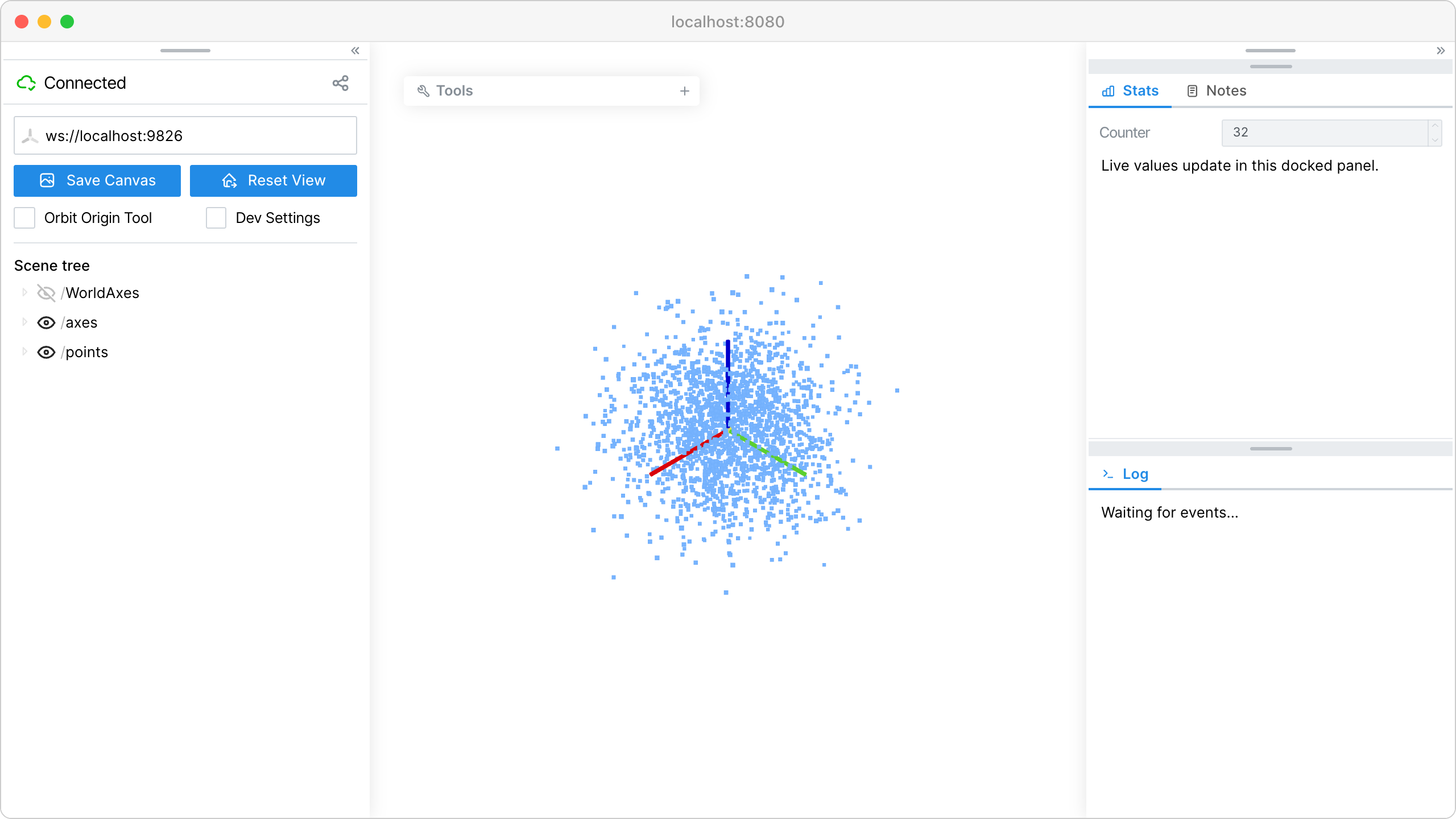
Create dockable / floating GUI panels that live outside the main control panel, and place them programmatically.
A panel is a dockable container; tabs are its content. Placement is imperative:
viser.GuiApi.add_panel()creates a standalone panel.viser.PanelHandle.add_tab()adds a tab to fill with GUI elements.viser.PanelHandle.dock_left()/viser.PanelHandle.dock_right()dock to a viewport edge.viser.PanelHandle.dock_above()/viser.PanelHandle.dock_below()stack a panel relative to another panel.viser.PanelHandle.float()floats a panel at an explicit position. The coordinates are relative to the viewport (the canvas inside any docked panels), so a float lands clear of docked panels and shifts to stay within the canvas if the docked regions change.viser.PanelHandle.set_width()/viser.PanelHandle.set_height()size a panel (set_heightapplies to floating panels only).
Panels start expanded. viser.PanelHandle.minimize() /
viser.PanelHandle.expand() collapse or reveal one imperatively –
applied to the panel’s containing window or docked column, exactly like
the on-screen minimize control (the panel header’s - button or the
dock chevrons).
Placement is replayed to clients that connect later, but is not continuously
synchronized: once a panel is placed, users can freely drag, dock, and minimize
it in the browser. The server owns a panel’s existence – there is no close
button; a panel disappears only when viser.PanelHandle.remove() is called.
viser.GuiApi.main_panel exposes the same placement commands for the main
control panel, and is a legal dock anchor for other panels.
Source: examples/02_gui/11_panels.py
Code
 1import time
 2
 3import numpy as np
 4
 5import viser
 6
 7
 8def main() -> None:
 9    server = viser.ViserServer()
10
11    server.scene.add_frame("/axes", axes_length=1.0, axes_radius=0.02)
12
13    # A panel docked to the right edge, with two tabs. Panels start
14    # expanded; minimize() below collapses the log panel imperatively, and
15    # the user can minimize/expand freely in the browser.
16    stats_panel = server.gui.add_panel()
17    with stats_panel.add_tab("Stats", viser.Icon.CHART_BAR):
18        counter = server.gui.add_number("Counter", initial_value=0, disabled=True)
19        server.gui.add_markdown("Live values update in this docked panel.")
20    with stats_panel.add_tab("Notes", viser.Icon.NOTES):
21        server.gui.add_markdown("A second tab in the same panel.")
22    stats_panel.dock_right()
23    stats_panel.set_width(320)
24
25    # A floating panel at an explicit position. x/y are viewport-relative (the
26    # canvas inside docked panels), so this stays clear of the left-docked main
27    # panel below and shifts if the docked regions change.
28    tools_panel = server.gui.add_panel()
29    with tools_panel.add_tab("Tools", viser.Icon.TOOL):
30        randomize = server.gui.add_button("Randomize point cloud")
31    tools_panel.float(x=30, y=30, width=260)
32    # Start the tools panel minimized (a floating panel collapses to its
33    # header bar). Collapse applies to the panel's CONTAINER -- panels
34    # stacked together minimize together -- so we demo it on a panel with
35    # its own window; log_panel below shares a column with stats_panel,
36    # and minimizing it would rail them both.
37    tools_panel.minimize()
38
39    # A panel stacked below the docked stats panel (a column split).
40    log_panel = server.gui.add_panel()
41    with log_panel.add_tab("Log", viser.Icon.TERMINAL):
42        log = server.gui.add_markdown("Waiting for events...")
43    log_panel.dock_below(stats_panel)
44
45    # The main control panel can be placed too -- here, docked to the left.
46    server.gui.main_panel.dock_left()
47
48    rng = np.random.default_rng(0)
49    points = rng.normal(size=(2000, 3)) * 0.5
50    log_lines: list[str] = []
51
52    def append_log(message: str) -> None:
53        # Keep a short rolling history so the log reads like a real log, not a
54        # single replaced line.
55        log_lines.append(message)
56        del log_lines[:-8]  # keep the last 8 lines
57        log.content = "\n\n".join(log_lines)
58
59    @randomize.on_click
60    def _(_) -> None:
61        nonlocal points
62        points = rng.normal(size=(2000, 3)) * 0.5
63        append_log(f"Randomized at t={counter.value}.")
64
65    while True:
66        counter.value += 1
67        server.scene.add_point_cloud(
68            "/points", points=points, colors=(120, 180, 255), point_size=0.02
69        )
70        time.sleep(0.5)
71
72
73if __name__ == "__main__":
74    main()